
What a fiscalisation API is
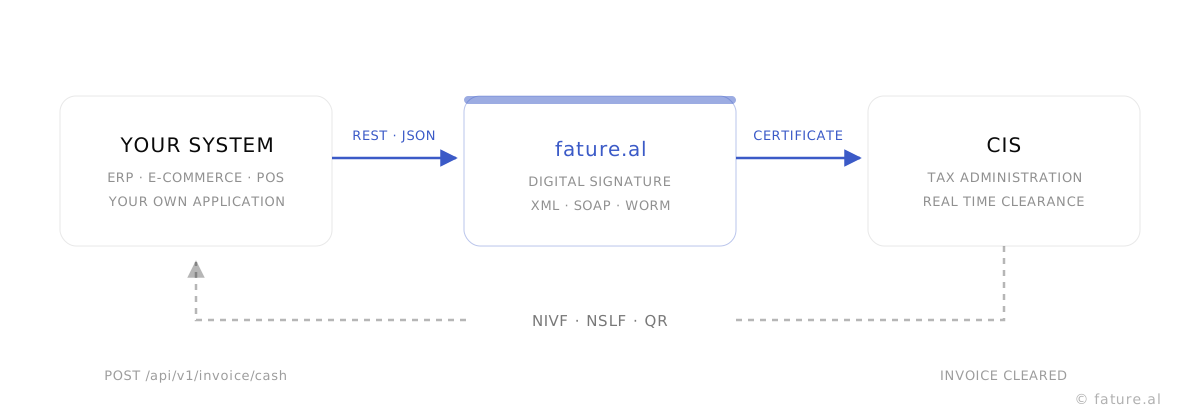
Albania runs a clearance model. An invoice is not reported after the fact and it is not batched into a periodic file. It goes to the tax administration the moment it is issued, is validated there, and comes back registered before the document reaches the customer. Locally the system is called fiskalizimi, which is why an Albanian developer searching for this page types "fiskalizimi API".
That model puts every system that issues invoices inside the clearance loop: an ERP, an online shop, a till application, or software written for one particular business. A fiscalisation API is how such a system joins the loop. You send the invoice as JSON to a single endpoint and get the cleared invoice back. You do not write XML, you do not speak SOAP, you do not handle certificates and you do not implement the retry queue for the times the tax platform is unreachable. That part is ours, and it is the same code the fature.al application itself runs on.
What one request does
The flow is the same for every invoice type. Your system sends a POST with the invoice lines. fature.al builds the fiscal document, signs it with the business certificate, sends it to the Central Information System and waits for the answer. The invoice is written at the same time into an archive that cannot be altered, because the law requires the trail.
The response does not return until the invoice is registered. When you receive
status: true, the invoice exists at the tax administration and the codes you
received are the ones printed on the document.
Why you cannot call the CIS yourself
This is the first question every engineering team asks, and it deserves a direct answer. The fiscalisation service does not accept a plain HTTP request. The message has to be XML formed exactly to the schema, digitally signed with the taxpayer electronic certificate, and the issuing software has to appear among the certified subjects published by the tax administration.
Beyond the specification there are obligations that only show up on the first day in production. An invoice that fails has to be retried. An invoice issued while offline has to arrive within 48 hours. Cash invoice numbering follows the fiscal device rather than your database. The certificate expires and has to be replaced without an interruption. None of that is a one time integration; it is standing work that follows every change the tax administration makes to the schema.
Going through our API leaves your system as the place where the business happens, while the Albanian clearance leg is maintained on our side. For a foreign group this is usually the decisive point: the group platform stays the system of record, and only the local obligation is delegated. There is more on that in the section on foreign companies with an Albanian entity.
Identification and credentials
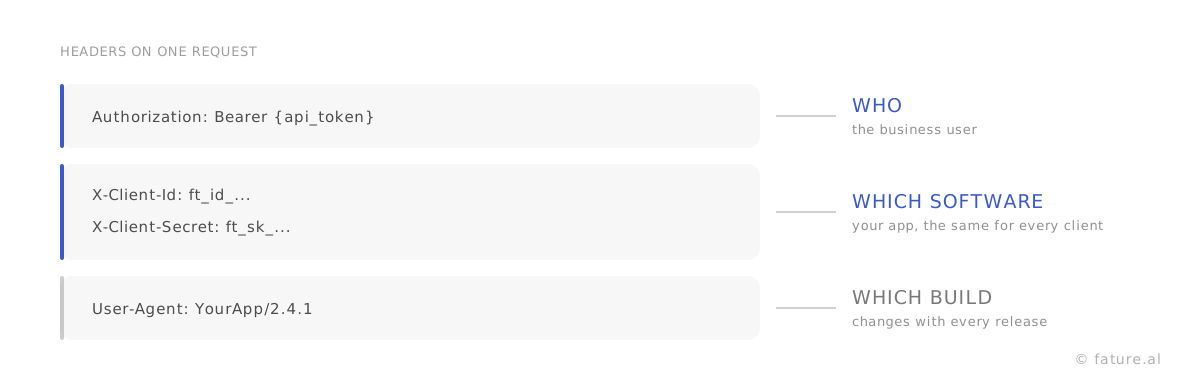
Every request carries two levels of identity. Who is calling is the user bearer token, and which software is calling is your application credentials.
Authorization: Bearer {api_token}
X-Client-Id: ft_id_...
X-Client-Secret: ft_sk_...
User-Agent: YourApp/2.4.1
The token is generated by the business itself under Settings and API Tokens, or returned by the registration response when you onboard the business over the API. It differs from one client to the next. The client id and client secret, by contrast, belong to your application and are the same for every business running it.
The secret is shown once, at the moment it is generated. If it is lost or you suspect it leaked, you rotate it from the same screen. The client id survives a rotation, so only one value has to reach your deployment.
The endpoints that matter
Everything below is prefixed with /api/v1. This table is the map, not the
reference. Each endpoint with its fields, examples and responses is in the
API documentation.
| Endpoint | What it does |
|---|---|
POST /invoice/cash |
Cash invoice: banknotes, card, voucher or cash on delivery. Numbered against the fiscal device. |
POST /invoice/noncash |
Bank transfer invoice, numbered company wide. |
POST /invoice/e-invoice |
Electronic invoice into the government system, with an EIC and UBL. |
POST /invoice/order and /invoice/summary |
The open order and the summary invoice that settles it. |
POST /invoice/bulk-noncash |
Bulk submission of non-cash invoices, for periodic loads. |
POST /invoice/wtn |
Warehouse transfer note for moving goods. |
POST /invoice/cancel/{id} |
Cancellation, also by your own key with /invoice/cancel-by-internal-id/{internalId}. |
GET /invoice/print/{id} |
The invoice PDF, ready to send or print. |
POST /cash-register/open-balance |
Opening and closing the cash register, required for cash trade. |
GET /client/search |
Look a business up in the fiscal register by its NIPT. |
GET /reports/* |
Turnover, VAT, top products and clients, aggregated in the database. |
A cash invoice, end to end
For most integrations this is the whole thing. One POST, one response, a cleared invoice.
POST https://demo.fature.al/api/v1/invoice/cash
Authorization: Bearer {api_token}
X-Client-Id: ft_id_...
X-Client-Secret: ft_sk_...
Content-Type: application/json

{
  "internalId": "CASH-001",
  "payment_method": "BANKNOTE",
  "lines": [
    {
      "product_name": "Espresso",
      "product_code": "ESP-01",
      "unit": "pcs",
      "quantity": 2,
      "price": 100,
      "total": 200,
      "vat": 20
    }
  ]
}
The response carries the registered invoice. iic is the NSLF generated by the
issuing software, fic is the NIVF returned by the Central Information System,
and verifyURL is the address behind the QR code printed on the invoice.
{
  "status": true,
  "data": {
    "invoice": {
      "id": 918273,
      "number": "12/2026/aa123bb456",
      "iic": "A1B2C3D4E5F6...",
      "fic": "0f8a2c4e-...",
      "tcrCode": "aa123bb456",
      "businessCode": "bb123cc456",
      "operatorCode": "cc123dd456",
      "fiscalizedAt": "2026-08-25 11:42:07",
      "verifyURL": "https://efiskalizimi-app.tatime.gov.al/invoice-check/#/verify?iic=...",
      "pdf": "https://fature.al/api/v1/invoice/print/918273"
    }
  }
}
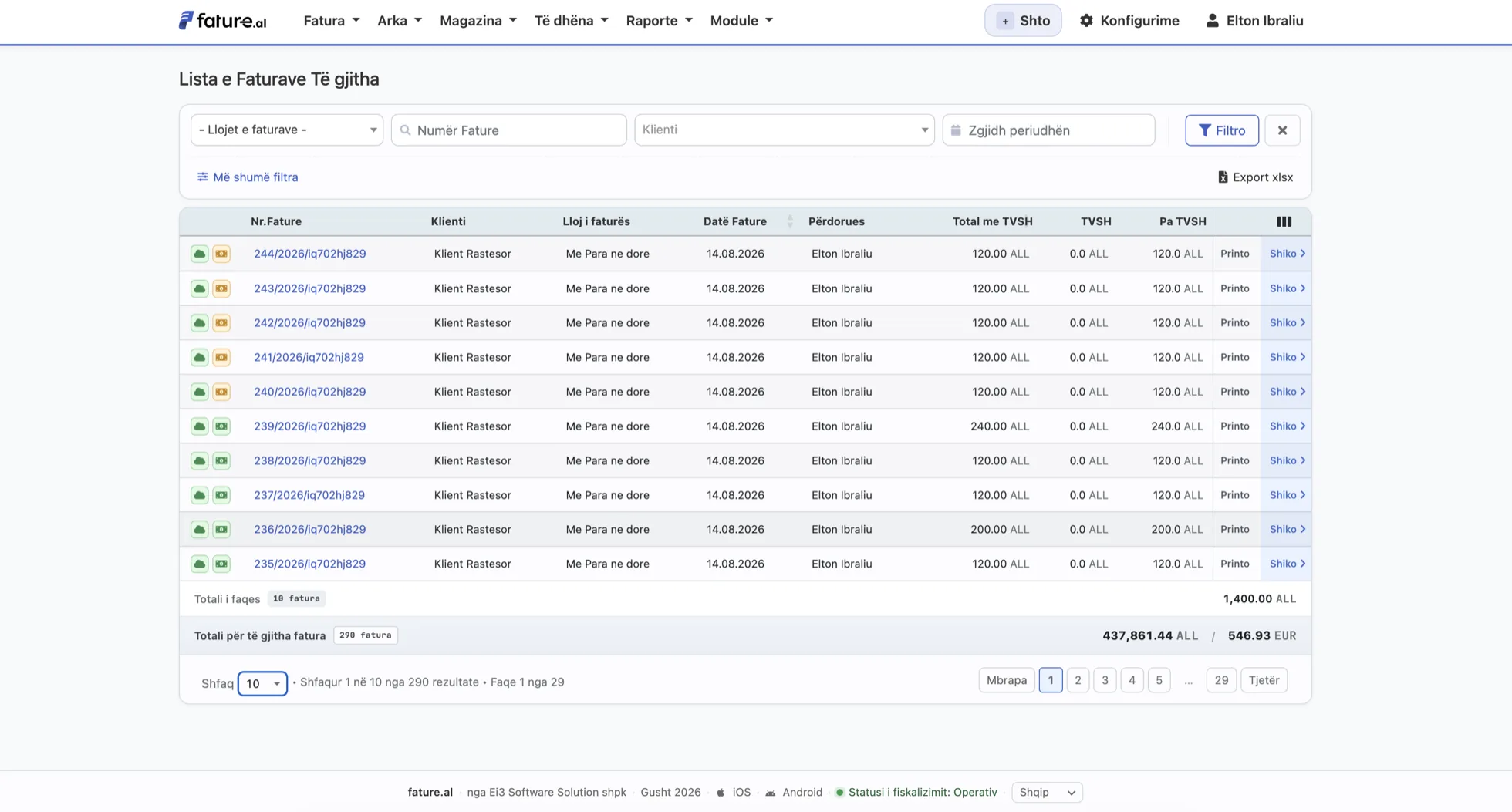
Note the VAT rate: Albania's standard rate is 20 percent, with reduced rates of 10 and 6. An invoice created over the API is an ordinary invoice inside fature.al. It appears in the list, it counts in the reports and in the VAT return, and it prints exactly like an invoice entered by hand.
Registering a business over the API
If you are a software provider bringing your own clients, they never have to touch the panel. The whole initial setup runs over the API, in five calls made once per business.
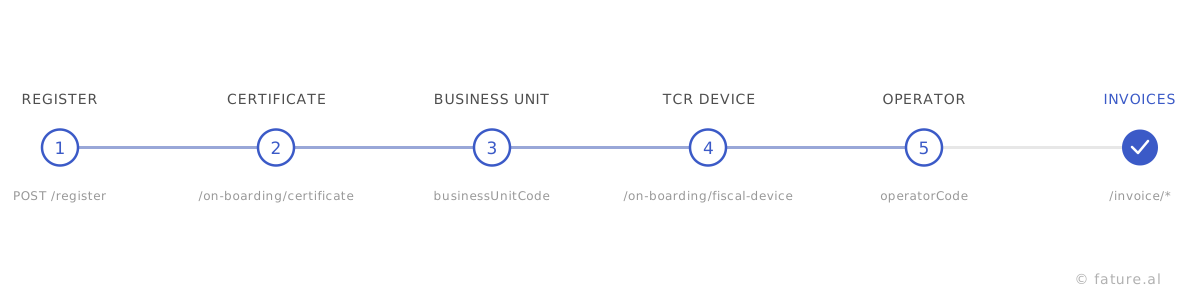
POST /registercreates the company and returns the token and the branch id.POST /on-boarding/certificateuploads the electronic certificate.POST /on-boarding/branch/{id}sets the business unit code.POST /on-boarding/fiscal-deviceregisters the fiscal device and returns the TCR code.POST /on-boarding/user/{id}ties the operator code to the device.
After the fifth call the business is ready. The operator code and the business unit code come from the tax administration Self Care platform, and what they are and where they are issued is covered under what a business needs before it can invoice.
Sandbox and going live
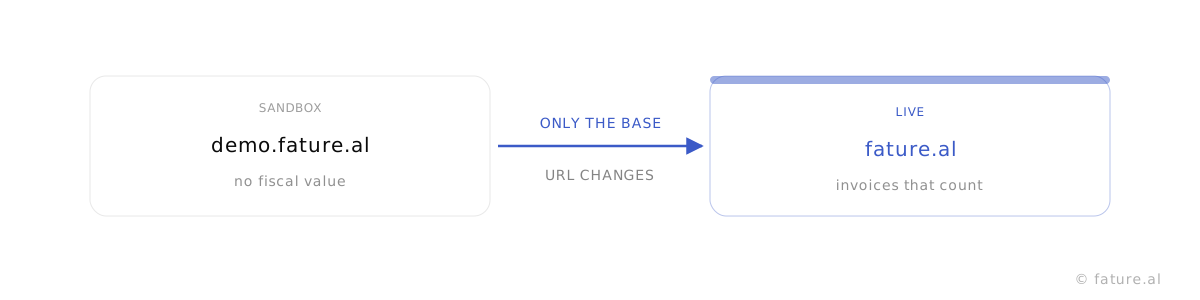
Build against https://demo.fature.al. Invoices issued there carry no fiscal
value and can be used freely for testing. When your flow is complete, move to
https://fature.al by changing the base URL. No field and no header changes.
Limits, errors and idempotency
The endpoints that issue fiscal invoices accept up to 30 requests per minute and 600 per
hour per user. The bulk endpoint is lower, while client search and the remaining
endpoints are more generous. When a limit is reached the response is 429 with
a Retry-After header telling you how many seconds to wait.
internalId is the invoice identifier in your system and is required on every
endpoint that issues an invoice. It doubles as the idempotency key, so a request sent
twice does not create two invoices. The same field lets you find the invoice later with
POST /invoice/details/{internalId} without storing our id.
Do not rely on the HTTP status alone. Before reading data, check that
status is true. On failure the messages arrive in the
errors array and should be displayed or logged, because that is where the
actual reason for a rejection from the tax administration appears.
{
  "status": false,
  "message": "The error message",
  "errors": ["First detail", "Second detail"]
}
When the connection drops
Fiscalisation needs the internet, but selling cannot stop. When the link to the tax administration is down the invoice is stored and sent automatically once the service is back, within the legal window of 48 hours. You do not implement that retry queue: it already exists and works the same for invoices that arrive over the API.
For businesses where even the local connection is unreliable there is a local agent that runs on a machine at the premises and keeps the till working while the line is down. That is an additional module. Talk to us if you need it.
Who this is for
Three situations account for almost every integration we see. A software house with an existing product in Albania, adding fiscalisation instead of building it. A foreign group whose Albanian subsidiary has to clear invoices locally while the group ERP stays the system of record. And an online business whose shop issues invoices automatically, which in Albania means card payments are cash transactions and need a fiscal device registered against an online trade business unit.
If your platform is one we already cover, you may not need to write code at all. The Shopify and Wolt connectors are built on these same endpoints. Service availability is published openly on the fiscalisation status page, so you can tell a problem in your integration from a problem at the tax administration.
Frequently asked questions
What is a fiscalisation API?
It is a REST interface that lets another system, an ERP, an online shop or software you wrote yourself, issue fiscalised Albanian invoices without anyone opening fature.al. You send the invoice as JSON, we sign it and register it with the Central Information System of the Albanian tax administration, and you get back the NIVF, the NSLF, the verification URL and the PDF.
Can our system talk to the Albanian tax platform directly?
Not in practice. The invoice has to be signed with the taxpayer electronic certificate and formed exactly as the fiscalisation service expects, and the software that issues it has to be certified. That is why the integration runs through a certified provider, which takes on the signing, the XML, the mandatory archive and the retry loop.
Which programming language do we need?
Any language that can make an HTTP request. The API is REST with JSON, there is no mandatory SDK and no SOAP on your side. PHP, C#, Java, Python, Go and Node.js are all the same amount of work, because all it takes is a POST with three headers and a JSON body.
Does our Albanian subsidiary still need a certificate and a fiscal device?
Yes. Both belong to the business that issues the invoice, not to the software. The certificate is uploaded once, the business unit and the fiscal device are configured once, and every invoice after that is a single request. All of those steps can be done over the API as well, without anyone logging into a panel.
How long does fiscalisation take?
The invoice is cleared inside the same request. The response does not come back until the Central Information System has validated the invoice and returned the NIVF, so when you get status true the invoice is already registered and can be handed to the customer.
What does the API return once the invoice is cleared?
The invoice number, the NSLF generated by the issuing software, the NIVF returned by the Central Information System, the fiscal device code, the business unit code, the operator code, the verification URL that sits behind the QR code, and a link to the invoice PDF.
Can a fiscalised invoice be cancelled over the API?
Yes, by id or by your own internalId. Albanian law has no deletion of a registered invoice, so the cancellation is carried out by a corrective invoice that references the original and carries negative values.
Is there a sandbox?
Yes. The whole integration is built against demo.fature.al, where invoices carry no fiscal value. When your flow is complete you change the base URL to fature.al and nothing else. Requests and responses are identical in both environments.
How many invoices per minute can we send?
The endpoints that issue fiscal invoices accept up to 30 requests per minute and 600 per hour per user, and the bulk endpoint is lower. When a limit is reached the response is HTTP 429 with a Retry-After header. If your volume is consistently higher than that, talk to us.
Is the API documentation available in English?
The reference at /docs/api is written in Albanian, because it is read mostly by developers working inside the country. It is also published as OpenAPI 3.1 JSON and as Markdown, and the field names, the endpoints and the error codes are in English, so an English speaking developer can work from the specification directly. Ask us and we will walk your team through the first calls.
How to start
Open a free account, generate a token under Settings and API Tokens, and send the first
request against demo.fature.al. The full reference with every field and every
response is the API documentation, also published as OpenAPI JSON
and as Markdown for AI assistants.
If you are a software house or a group IT team planning an Albanian integration, write to [email protected]. We issue the application credentials and a test environment, and we go through the first cases with your developers. We are happy to answer technical questions about how the system behaves in production whether or not anything commercial follows.